 by
by In this tutorial, Developer will learn how to create a simple AJAX filter for a custom post list.
Requirements:
- Plugin
Lazy Block – This plugin will hold the custom list query. The developer can have the option to create using WordPress do_shortcode()
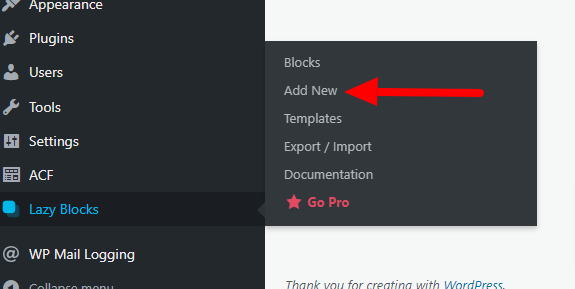
1. After Installing Lazy Block, Create a New Block. Lazy Block -> Add New.
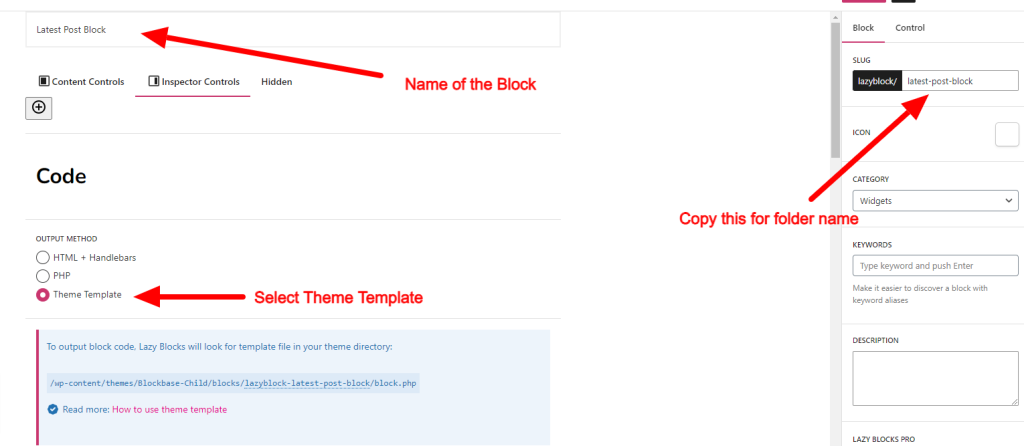
2. In the Lazy Block editor, Input the block name, Output method and follow the instructions for creating a new folder for your newly created custom block.
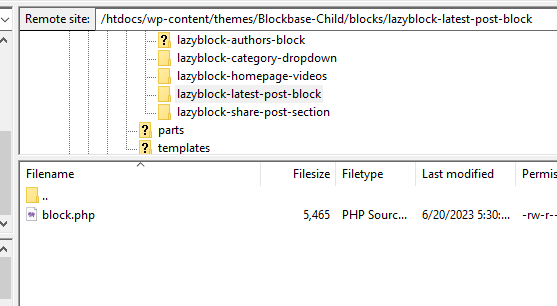
3. Create the required folders and block.php file on the Child-theme folder.
4. In the block.php, Paste this PHP code. This code will display the initial blog list.
<?php
    $args = array(
        'post_type' => 'post',
        'order' => 'DESC',
        'posts_per_page' => 6,
    );

    $query = new WP_Query( $args );
    if ( $query->have_posts() ) { ?>
        <div id="custom-post-list" >
            <?php while ( $query->have_posts() ) {
                $query->the_post();

                $featured_img = get_the_post_thumbnail_url( get_the_ID() );
                $categories = get_the_category();
                $separator = ' ';
                $output = '';

                if ( !empty( $categories ) ) {
                    foreach( $categories as $category ) {
                        $output .= '<span>' . esc_html( $category->name ) . '</span>' . $separator;
                    }
                }

                $content = wp_trim_words( get_the_content(), 20, '...' );
?>
                    <div class="post-item">
                        <div class="img-holder" style="background-image: url();">
                            <img src="<?php echo $featured_img; ?>" alt="<?php echo get_the_title(); ?>">
                        </div>
                        <div class="post-item-body">
                            <h3><?php echo get_the_title(); ?></h3>
                            <p class="category"><?php echo $output; ?></p>
                            <div class="text">
                                <p><?php echo $content; ?></p>
                                <p>
                                    <span class="post-author">By <?php echo get_the_author(); ?></span>,
                                    <time datetime="<?php echo get_the_date(); ?>"><?php echo get_the_date(); ?></time>
                                </p>
                            </div>
                        </div>
                    </div>
<?php } wp_reset_postdata(); ?>
        </div>
<?php } else { echo '<p>No custom posts found.</p>'; } ?>
5. Open function.php from your child-theme folder. Paste/Add this code first inside the function your_theme_enqueue_styles(). To register the script that will enable the developer to execute AJAX query using javascript/jquery.
    wp_enqueue_script( 'custom-script', get_stylesheet_directory_uri() . '/assets/js/custom-script.js', array( 'jquery' ), '1.0.0', true );
    wp_localize_script( 'custom-script', 'ajaxurl', array( 'ajaxurl' => admin_url('admin-ajax.php') ) );
6. Paste the code below on the same file. The function custom_post_list_ajax_callback will re-query your post list with added category filter based on the user picked from the select box.
// Category filter
add_action('wp_ajax_custom_post_list', 'custom_post_list_ajax_callback');
add_action('wp_ajax_nopriv_custom_post_list', 'custom_post_list_ajax_callback');

function custom_post_list_ajax_callback() {
    $category_name = ( $_POST['category'] ) ? $_POST['category'] : '';
    ob_start();

    $args = array(
        'post_type' => 'post',
        'order' => 'DESC',
        'posts_per_page' => 6,
        'cat' => $category_name
    );
    $query = new WP_Query($args);

    if ($query->have_posts()) {
        while ($query->have_posts()) {
            $query->the_post();
            $featured_img = get_the_post_thumbnail_url( get_the_ID() );
            $categories = get_the_category();
            $separator = ' ';
            $output = '';

            if ( !empty( $categories ) ) {
                foreach( $categories as $category ) {
                    $output .= '<span>' . esc_html( $category->name ) . '</span>' . $separator;
                }
            }

            $content = wp_trim_words( get_the_content(), 20, '...' ); ?>
            <div class="post-item">
                <div class="img-holder">
                    <img src="<?php echo $featured_img; ?>" alt="<?php echo get_the_title(); ?>">
                </div>
                <div class="post-item-body">
                    <h3><?php echo get_the_title(); ?></h3>
                    <p class="category"><?php echo $output; ?></p>
                    <div class="text">
                        <p><?php echo $content; ?></p>
                        <p>
                            <span class="post-author">By <?php echo get_the_author(); ?></span>,
                            <time datetime="<?php echo get_the_date(); ?>" class="catalogue-time"><?php echo get_the_date(); ?></time>
                        </p>
                    </div>
                </div>
            </div>
<?php   } wp_reset_postdata();
    } else { echo '<p>No custom posts founds.</p>'; }
    wp_die(ob_get_clean());

}
7. The code below is the Select box code. Copy this code to the custom block created earlier or create another custom block for more ways to customize the layout. as long as both blocks are implemented on the same page/template.
<div class="filter-section filtration-form">
    <label class="form-group">
        <select name="category" id="category-dropdown">
            <option value="">Select Category</option>
            <?php
                $categories = get_categories();
                foreach($categories as $category){ ?>
                    <option value="<?php echo $category->cat_ID ?>"><?php echo $category->name ?></option>
            <?php } ?>
        </select>
    </label>
</div>
8. In the custom-script.js or any js file within the child-theme folder. Add the Jquery script that will trigger the onChange event when a user chooses a category on the select box.
<script>
    jQuery(document).ready(function($) {
        // get the ID of the select box for onChange event
        var $categoryDropdown = $('#category-dropdown');
        // get the parent wrapper for displaying the Post list
        var $postList = $('#custom-post-list');

        // Load posts based on selected category
        $categoryDropdown.on('change', function() {
            // loadPosts function will be triggered once the #category-dropdown is onChange
            loadPosts();
        });

        // Function to load posts via AJAX
        function loadPosts() {
            var category = $categoryDropdown.val();
            console.log("category picked is: ", ajaxurl);

            // this will be passed to the functions.php.
            // if success $postList will be populated with post base on what category is selected
            $.ajax({
                url: ajaxurl.ajaxurl,
                type: 'POST',
                data: {
                    action: 'custom_post_list',
                    category: category,
                },
                beforeSend: function() {
                    // Display loading spinner or message if desired
                    $postList.html('Loading...');
                },
                success: function(response) {
                    $postList.html(response);
                },
                error: function(response) {
                    $postList.html('Error loading posts.');
                }
            });
        }
    });
</script>