 by
by In this tutorial you learn how to make your jetpack testimonial into a slider. (note: This tutorial assumes that you have already enable the testimonial settings on jetpack)
Requirements:
- Slick slider scripts and styles (see reference: slick – the last carousel you’ll ever need (kenwheeler.github.io))
- Jquery
- CSS
- Jetpack testimonial
note: this is assuming that you have added the script and styles of the slick slider.
- Create a dummy post in your jetpack testimonial
- Then create a shortcode.php in your theme and copy and paste the code below. (note: don’t forget to include your shortcode.php in your functions.php)
/**
*	Testimonial Template
*/

function slider_jetpack_testimonial_sc($atts, $content){
	extract( shortcode_atts( array(
	), $atts));

	ob_start();

		$args = array(
			'post_type' => 'jetpack-testimonial'
		);

		// The Query
		$the_query = new WP_Query( $args );

		?>
		<div class="slider-test-container">
			<?php
			// The Loop
			if ( $the_query->have_posts() ) {
				while ( $the_query->have_posts() ) {
					$the_query->the_post();
					?>
						<div class="slider-test-item">
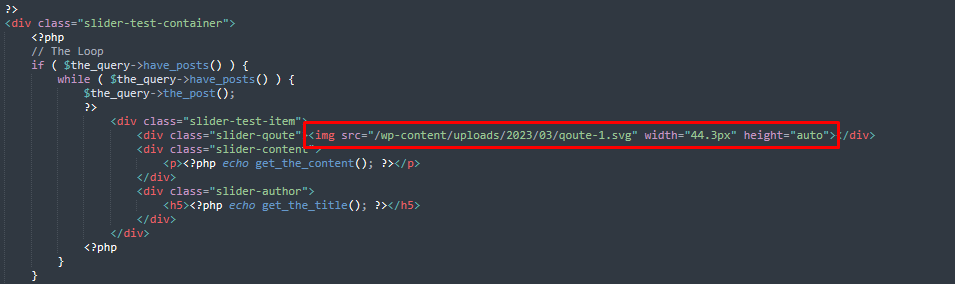
							<div class="slider-qoute"><img src="/wp-content/uploads/2023/03/qoute-1.svg" width="44.3px" height="auto"></div>
							<div class="slider-content">
								<p><?php echo get_the_content(); ?></p>
							</div>
							<div class="slider-author">
								<h5><?php echo get_the_title(); ?></h5>
							</div>
						</div>
					<?php
				}
			}

			/* Restore original Post Data */
			wp_reset_postdata();
			?>
		</div>
		<?php

		return do_shortcode( ob_get_clean() );
	}
add_shortcode('slider_jetpack_testimonial', 'slider_jetpack_testimonial_sc');- Make sure to upload your slider qoute image and update it in your code.
- Next is copy this styles below
 /**
 * Testimonial Slider
 * */
 .slider-test-item .slider-qoute{
   text-align: center;
    margin-bottom: 40px;
 }

 .slider-test-item .slider-qoute img{
   margin: 0 auto;
 }

 .slider-test-item .slider-content {
   width: 950px;
    text-align: center;
    margin: 0 auto 20px auto;
    max-width: 100%;
    color: #5F5F5F;
 }

 .slider-test-item .slider-author h5{
   text-align: center;
    font-size: 22px;
    color: #1C2340;
    font-weight: 600;
    margin-bottom: 56px;
 }

 body .slick-dots li button:before{
   font-size: 12px;
 }

/* end */- Then in your script copy the code below and make sure it to call it inside your ready function.
function testimonial_slider(){
        $('.slider-test-container').slick({
          dots: true,
          infinite: true,
          speed: 300,
          slidesToShow: 1,
          adaptiveHeight: true,
          autoplay: true,
          autoplaySpeed: 4000
        });
}- After you are done with this click save and you are done.
If you have any question just contact the author of this post.