by
by register_block_pattern( string $pattern_name, array $pattern_properties )
- This is how to registered a custom block pattern.
add_action( 'init', function(){
	register_block_pattern(
		'simple-heading/my-custom-heading-pattern',
		array(
			'title'       => __( 'About content', 'simple-heading' ),

			'description' => _x( 'Section Abouts content', 'simple-heading' ),

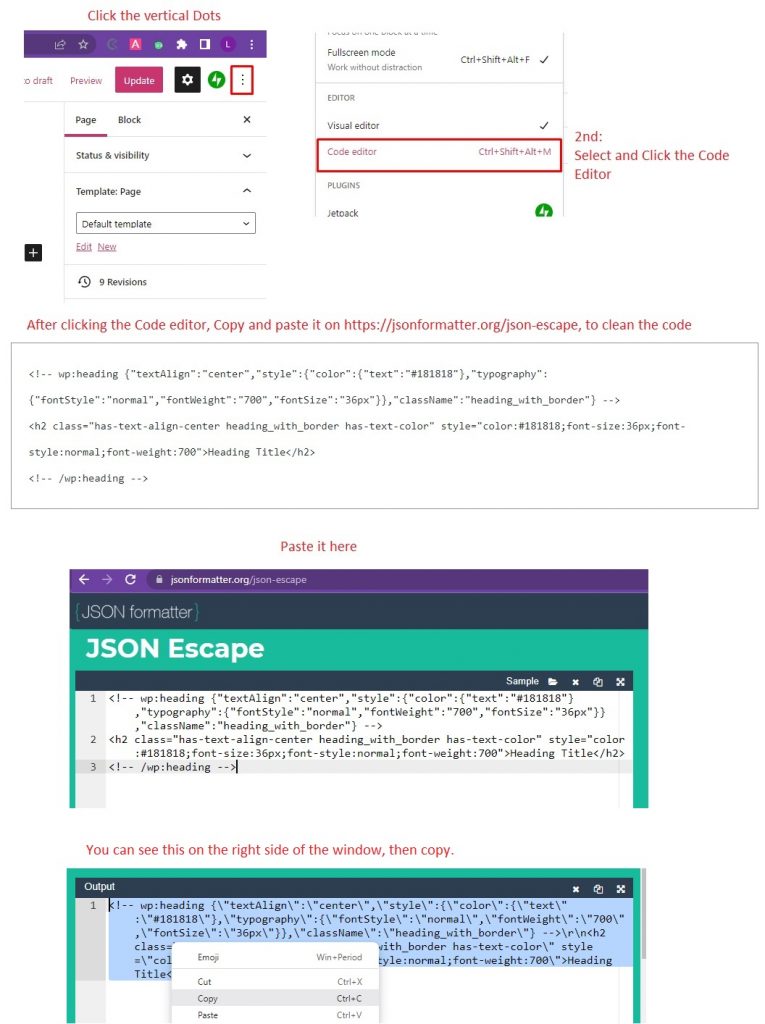
			'content'     => "<!-- wp:heading {\"textAlign\":\"center\",\"style\":{\"color\":{\"text\":\"#181818\"},\"typography\":{\"fontStyle\":\"normal\",\"fontWeight\":\"700\",\"fontSize\":\"36px\"}},\"className\":\"heading_with_border\"} -->\r\n<h2 class=\"has-text-align-center heading_with_border has-text-color\" style=\"color:#181818;font-size:36px;font-style:normal;font-weight:700\">Heading Title</h2>\r\n<!-- /wp:heading -->",

			'categories'  => array( 'featured', 'about', 'blockbase' ),
		)
	);

});- Copy and paste the code above, to functions.php
- The ‘content’ is where we can put or write the design layout of the pattern, this is how to get code on the page editor. see the screenshot below.